Saturday, May 21, 2022

Glimmer DSL for LibUI 0.5.11 - Basic Shape Drag & Drop

Glimmer DSL for LibUI 0.5.11 (Fukuoka Ruby 2022 Award Winning Desktop Development GUI Library) has just been released with the following changes (courtesy of the Perfect Shape gem): 

  • Upgrade to perfect-shape 1.0.4 (geometric algorithms)
  • Update examples/shape_coloring.rb with basic drag and drop support
  • Support `#move_by(x_delta, y_delta)` (alias `translate`) method on all shapes and `path` (e.g. useful in drag and drop)
  • Support `#move(x, y)` method on all shapes and `path` to move to x,y coordinate directly
  • Support `#min_x` minimum x coordinate of shape/`path` (of top-left corner)
  • Support `#min_y` minimum y coordinate of shape/`path` (of top-left corner)
  • Support `#max_x` maximum x coordinate of shape/`path` (of bottom-right corner)
  • Support `#max_y` maximum y coordinate of shape/`path` (of bottom-right corner)
  • Support `#center_point` (`Array` of x,y) center point of shape/`path`
  • Support `#center_x` center x coordinate of shape/`path`
  • Support `#center_y` center y coordinate of shape/`path`

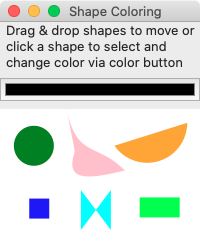
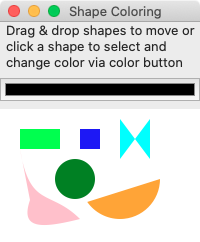
You can now drag and drop shapes to move them around in the Shape Coloring example.

# From: https://github.com/AndyObtiva/glimmer-dsl-libui#shape-coloring
require 'glimmer-dsl-libui'
class ShapeColoring
include Glimmer::LibUI::Application
COLOR_SELECTION = Glimmer::LibUI.interpret_color(:red)
before_body {
@shapes = []
}
body {
window('Shape Coloring', 200, 220) {
margined false
grid {
label("Drag & drop shapes to move or\nclick a shape to select and\nchange color via color button") {
left 0
top 0
hexpand true
halign :center
vexpand false
}
color_button { |cb|
left 0
top 1
hexpand true
vexpand false
on_changed do
@selected_shape&.fill = cb.color
end
}
area {
left 0
top 2
hexpand true
vexpand true
rectangle(0, 0, 600, 400) { # background shape
fill :white
}
@shapes << colorable(:rectangle, 20, 20, 40, 20) {
fill :lime
}
@shapes << colorable(:square, 80, 20, 20) {
fill :blue
}
@shapes << colorable(:circle, 75, 70, 20) {
fill :green
}
@shapes << colorable(:arc, 120, 70, 40, 0, 145) {
fill :orange
}
@shapes << colorable(:polygon, 120, 10, 120, 50, 150, 10, 150, 50) {
fill :cyan
}
@shapes << colorable(:polybezier, 20, 40,
30, 100, 50, 80, 80, 110,
40, 120, 20, 120, 30, 91) {
fill :pink
}
on_mouse_dragged do |area_mouse_event|
mouse_dragged(area_mouse_event)
end
on_mouse_dropped do |area_mouse_event|
mouse_dropped(area_mouse_event)
end
}
}
}
}
def colorable(shape_symbol, *args, &content)
send(shape_symbol, *args) do |shape|
on_mouse_up do |area_mouse_event|
unless @dragged_shape
old_stroke = Glimmer::LibUI.interpret_color(shape.stroke).slice(:r, :g, :b)
@shapes.each {|sh| sh.stroke = nil}
@selected_shape = nil
unless old_stroke == COLOR_SELECTION
shape.stroke = COLOR_SELECTION.merge(thickness: 2)
@selected_shape = shape
end
end
end
on_mouse_drag_started do |area_mouse_event|
mouse_drag_started(shape, area_mouse_event)
end
on_mouse_dragged do |area_mouse_event|
mouse_dragged(area_mouse_event)
end
on_mouse_dropped do |area_mouse_event|
mouse_dropped(area_mouse_event)
end
content.call(shape)
end
end
def mouse_drag_started(dragged_shape, area_mouse_event)
@dragged_shape = dragged_shape
@dragged_shape_x = area_mouse_event[:x]
@dragged_shape_y = area_mouse_event[:y]
end
def mouse_dragged(area_mouse_event)
if @dragged_shape && @dragged_shape_x && @dragged_shape_y
x_delta = area_mouse_event[:x] - @dragged_shape_x
y_delta = area_mouse_event[:y] - @dragged_shape_y
@dragged_shape.move_by(x_delta, y_delta)
@dragged_shape_x = area_mouse_event[:x]
@dragged_shape_y = area_mouse_event[:y]
end
end
def mouse_dropped(area_mouse_event)
@dragged_shape = nil
@dragged_shape_x = nil
@dragged_shape_y = nil
end
end
ShapeColoring.launch
Happy Glimmering!

No comments: