Showing posts with label Gladiator. Show all posts

Monday, August 14, 2023

Every True Rubyist Builds Their Own Code Editor in Ruby!

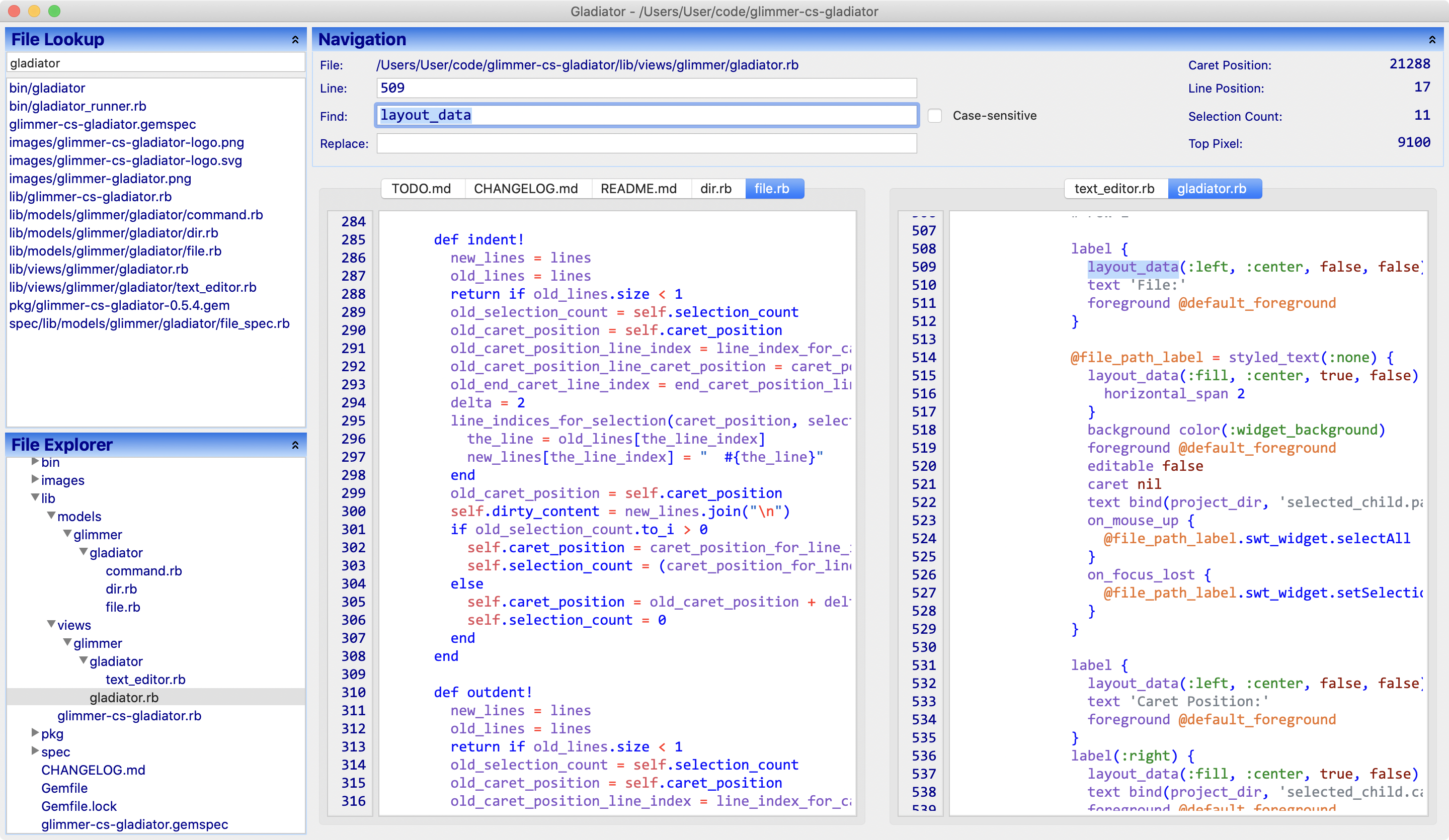
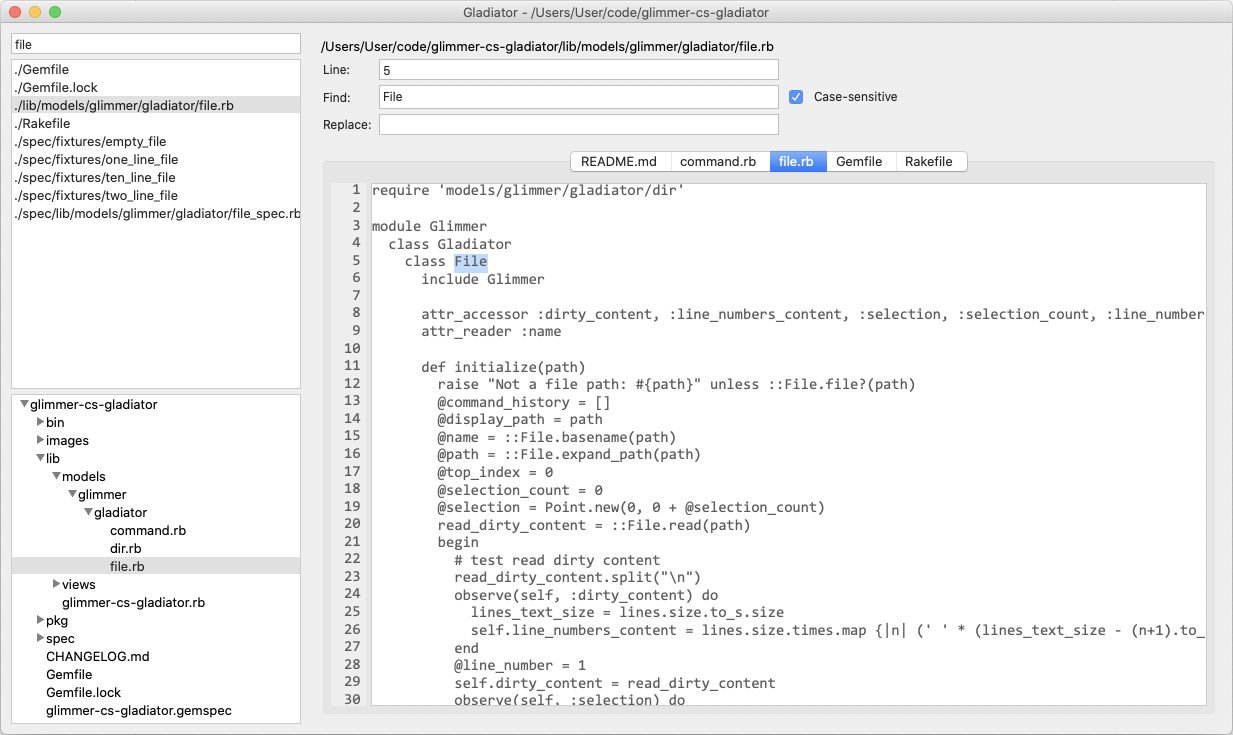
Gladiator (Glimmer Editor) 0.11.0 has just been released! It is my personal day-to-day code editor that I have built in Ruby using Glimmer DSL for SWT (JRuby Desktop Development Cross-Platform Native GUI Framework). It has syntax highlighting support for 40+ programming languages, split pane support with drag and drop, file look up support, directory tree navigation support, and many smart editing keyboard shortcuts. I use it for professional Ruby on Rails software engineering too.

That said, I am no code editor building expert, so Gladiator looks ugly! But, I love it because I built it 100% myself. Every self respecting Senior Software Engineer out there should build their own code editor, even if just as a toy app to later be discarded in favor of another code editor (though they might grow to prefer their own). And, if they are Rubyists, they should build their code editor in Ruby (whether using MRI Ruby, JRuby or Opal Ruby). If you think of yourself as a Ruby Senior Software Engineer, but cannot build your own code editor in Ruby, there are serious holes in your skillset!! Explore Glimmer libraries for many Ruby options to help you start the code editor building challenge and journey; whether using the Fukuoka Ruby 2022 Award Winning Glimmer DSL for LibUI, the 100% feature-complete JRuby-based Glimmer DSL for SWT, the brand new Glimmer DSL for WX, the Linux-focused Glimmer DSL for GTK, Glimmer DSL for Tcl/Tk, Glimmer DSL for FXRuby, Glimmer DSL for Swing, Glimmer DSL for JavaFX, or Glimmer DSL for Opal.


Nowadays, I see many Software Engineers on the Internet and social media who claim to be "Rubyists", but use non-Ruby code editors and non-Ruby frontend technologies, and that comes across as part hypocrisy and part lost opportunity!! After all, if they truly believed in Ruby, they would be building more things in it. Computer processors are so fast nowadays that many of Ruby's performance trade-offs are negligible in practice, except in some niche programming specialties like numerical computing, realtime systems, low-level programming, and performance-intensive game development. But sadly, in the last decade, many fake "Rubyists" entered the Ruby community just to associate with the "cool" factor of Ruby or to obtain Ruby job salaries without truly believing in Ruby 100% or even fully understanding the Ruby way of doing things. 

Thankfully, there are many litmus tests out there that reveal true Rubyists from fake "Rubyists", and one of them is whether a Ruby Software Engineer has built their own code editor in Ruby or not, or if they at least use a Ruby-based code editor like Redcar, Arcadia, or Gladiator, among others. Personally, I do not just write Ruby code in a web backend using Rails. I also write all my desktop applications in Ruby using Glimmer, including my code editor Gladiator, and I try to even build web frontend in Ruby using Opal Ruby.


Just think of how great it would be if the Ruby community had a feature-rich Ruby-scriptable code editor / IDE that makes it possible to build plug-ins with highly maintainable and productive Ruby code. It does not have to support every programming language out there. It can just be a Ruby community niche thing. With such a Ruby-based code editor, Rubyists would be practicing what they preach regarding the productivity/maintainability of Ruby programming by using Ruby to build the very tools they use in day-to-day Ruby software engineering.

Update: KOTP (keeperotphones) made a code contribution by email right after I posted this article to support missing Ruby file formats: 'rbw', 'gemspec'. Thank you KOTP!

Saturday, July 09, 2022

Montreal.rb 2022-07-07 Talk: How I Built My Code Editor in Ruby

I gave a talk at the Montreal.rb meetup group on 2022-07-07 titled: 

"How I Built My Code Editor in Ruby".

Here is the talk's video:

And, here are the presentation slides:

Related links:

Happy learning!

p.s. During the Gladiator demo, the Ruby script that I failed to run in the Scratchpad turned out not to be a bug... Upon watching the video, I noticed that I made a small mistake in writing the script, and the error message I got as a result was a valid error message that would have helped me correct my mistake if I had read it instead of skipping it during the presentation. In any case, I was able to run a Ruby script a little later in the other project I opened: Hello, Code Text!


Monday, June 13, 2022

Giving Montreal.rb Talk: How I Built My Code Editor in Ruby

I am giving a Ruby software engineering presentation at the next Montreal.rb meetup.

Title: How I Built My Code Editor in Ruby

Date/Time: Wednesday, July 6, 2022. Doors open at 6:30pm ET. Talk starts at 7pm ET.

Location: Lexop (my employer) on 506 McGill St Suite 400, Montreal, Quebec H2Y 2H6, Canada

Description:

Gladiator is a code editor that was built completely in Ruby. It supports syntax highlighting for over 30 programming languages, split pane, file name lookup, a variety of keyboard shortcuts, undo/redo, find and replace, line jumping, monitoring external file system changes, ignoring uneditable files, expanding to fill the screen, running Ruby code, remembering the last open files, and multi-project support. In fact, I have been using Gladiator for all my code editing needs since May of 2020.

In this talk, I will present Gladiator's features, and then dig into the implementation of every feature in Ruby, covering things like the Model-View-Controller and Model-View-Presenter architectural patterns, how to build custom widgets, how to implement file editing commands, and how to support undo/redo.

Attendees should walk out of this talk with rudimentary knowledge of how to build a code editor in Ruby.

---

If you live in Montreal, or anywhere nearby (e.g. Ottawa), come and join us!

RSVP at:

https://www.meetup.com/montrealrb/events/286529635/

Update 2022-07-09:

The talk video and presentation slides have been posted in this follow-up blog post:

https://andymaleh.blogspot.com/2022/07/montrealrb-2022-07-07-talk-how-i-built.html


Monday, January 11, 2021

Gladiator (Glimmer Editor) v0.7.0

Gladiator (Glimmer Editor) v0.7.0 (code text editor built in Ruby via Glimmer DSL for SWT) has been released! 


The focus of this version was maximizing the split pane and editor area via keyboard shortcuts (and menu items), thus providing maximum use of screen real estate, in addition to fixing some bugs. 

Gladiator Demo Video:


Change Log for v0.7.0:

  • Upgrade to glimmer-dsl-swt v4.18.0.0
  • Implement sash form for separator between file area and editing area to make resizable
  • Change shortcut for open project from CMD+SHIFT+P to CMD+O
  • Unsplit pane Menu Item / Keyboard Shortcut (CMD+SHIFT+U)
  • Maximize Split Pane Size Menu Item / Keyboard Shortcut (CMD+SHIFT+M)
  • Reset Split Pane Menu Item / Keyboard Shortcut (CMD+SHIFT+M again while maximized or CMD+SHIFT+P to reset split widths)
  • Maximize Editor Menu Item / Keyboard Shortcut (CMD+CTRL+M)
  • Reset Editor Menu Item / Keyboard Shortcut (CMD+CTRL+M again while maximized or CMD+CTRL+R to reset all sizes)
  • Make CMD R and CMD T shortcuts show the file lookup/file explorer if collapsed (just like CMD + F shows navigation area)
  • Display Accelerators (keyboard shortcuts) on Mac Menu Items
  • Show exception dialog on error when invoking Run -> Ruby
  • Fix issue with creating a new directory in a different project from the main one open
  • Fix issue with quitting gladiator when multiple projects are open requiring multiple presses of CMD+Q

Enjoy Gladiator, the Ugliest Text Editor Ever!

Monday, November 23, 2020

Gladiator Gets a Small Makeover with Collapsable Sections!

Gladiator (Glimmer Editor) v0.6.0 gets a small makeover via collapsable sections (`expand_bar` and `expand_item` Glimmer GUI DSL keywords) for the File Lookup List Filter, File Explorer Tree, and Navigation Area.

In other news, Glimmer DSL for SWT v4.17.10.2 and Glimmer v1.0.4 are out!

Happy Glimmering!

Tuesday, November 03, 2020

Gladiator 0.5.2, Glimmer DSL for SWT 4.17.8.2, and Glimmer DSL for Opal 0.5.1

Gladiator 0.5.2, Glimmer DSL for SWT 4.17.8.2, and Glimmer DSL for Opal 0.5.1 have been released. You can check their change logs (under CHANGELOG.md in each project) to find out what the changes were.

Gladiator now has a Scratchpad to run arbitrary Ruby code (including instrumenting Gladiator itself or any Glimmer app run from Gladiator for that matter) as well as a new Open Project menu item.

Glimmer DSL for SWT has got two new custom widgets: radio_group and checkbox_group, which are just variations on radio (SWT button(:radio)) and checkbox (SWT button(:check)) to enable dynamically spawning radios and checkboxes via data-binding to model properties.

Glimmer DSL for Opal has got the same new widgets from Glimmer DSL for SWT as well as a number of new samples such as Hello, Radio!, Hello, Checkbox!, and Hello, Group!

Happy Glimmering!

Friday, October 23, 2020

Gladiator Finally Gets Colors with Ruby Syntax Highlighting!

Gladiator (text editor fully written in Ruby) finally gets colors with Ruby Syntax Highlighting in version 0.4.0, released along with Glimmer DSL for SWT patch 4.17.4.2

Additionally, these new features have been added:

  • Run a Ruby file from the Run menu (or CMD+SHIFT+R shortcut)
  • Change split orientation to Horizontal/Vertical from the View menu (or CMD+SHIFT+O shortcut)


Happy Glimmering!

Thursday, July 23, 2020

Gladiator v0.2.3 is out!

Gladiator (Glimmer Editor) v0.2.3 is out with this fix:

  • Improved performance and display of file lookup list (removing current local directory from file prefix)

Come grab the Ugliest Text Editor Ever™ while it's hot!


Saturday, July 11, 2020

Gladiator (Glimmer Editor) 0.2.1 Drag and Drop Split Screen

Gladiator (Glimmer Editor) 0.2.1 is out with very rudimentary drag and drop split screen support (bare minimum to meet my text editor split screen needs).


Enjoy the ugliest text editor ever!

Tuesday, June 09, 2020

Gladiator 0.1.8 Undo/Redo & Case-Sensitive Find/Replace

Gladiator (Glimmer Editor) 0.1.8 has shipped with the following changes:
- Undo/Redo
- Case-sensitive Find (and Replace by extension)
- Make CMD+SHIFT+] at the last tab go to the first tab (and vice versa with CMD+SHIFT+[)
- Fix Line/Find/Replace actions when no file is open (to avoid crash)
- Fix issue with file lookup list expanding all the way down, covering the file tree
- Fix issue with hitting home/end with selection keeping selection instead of removing it
- Fix issue with crashing if no file was open, no file is found in lookup list, and you attempt to hit enter in keyboard


Enjoy!

Monday, May 25, 2020

Math Bowling 2

Math Bowling 2, an open-source math game written in Glimmer (Ruby Desktop Development Library), has been released!

You may check its GitHub repo for an example of a complete desktop application written in Ruby using Glimmer.

Here are also video demos of the game for a quick tutorial on how to play:
Enjoy!


In other related news, Glimmer (Ruby Desktop Development Library) 0.7.6 and Gladiator (Glimmer Editor) 0.1.6 have been released.

Glimmer change log for v0.7.6:

- Support text widget selection data-binding explicitly
- Make specs pass on Linux
- Maintain tree item expansion on data-binding related changes
- Make scaffolded apps launch from bin file not app file

Gladiator change log for v0.1.6:

- Support Linux explicitly (sort of)
- Make file tree maintain expansion state on refreshes caused by internal & external changes

Happy Glimmering!

Friday, May 22, 2020

Glimmer 0.7.5 & Gladiator 0.1.5 Released

Glimmer 0.7.5 Desktop Development Library for Ruby ships with the following changes:

- Make :virtual a default tree SWT style
- Support Tree selection databinding (just like List)
- Support built-in Tree editing (i.e. editing tree item text)
- Support unregistering widget listeners
- Added tab item proxy dispose method that automatically unsets/disposes tab item inner control before disposing tab item itself

Gladiator 0.1.5 (Glimmer Editor) ships with the following changes:

- Remember all open text editor tabs when closing and reopening
- Support closing text editor tabs with keyboard shortcuts (closing current tab, closing all tabs other than current one, closing all tabs)
- Support prefix new indented line when hitting CMD+SHIFT+ENTER in the middle of a line
- Make CMD+T auto-select open file in file tree
- Make gladiator command accept directory argument instead of LOCAL_DIR and automatically open directory passed in
- Fix rename bug for when focusing out without changing name
- Fix bug with opening file with ENTER key from file tree
- Fix issue with changes not persisting when done via find/replace on a newly browsed to tab

Get them while they're hot!

Tuesday, May 19, 2020

Glimmer 0.7.4 & Gladiator 0.1.4 Released

Glimmer 0.7.4 Desktop Development Library for Ruby ships with the following changes:

- Have tree data-binding auto-embed models as tree item data
- TreeProxy#depth_first_search implementation
- Support read-only data-binding

Gladiator 0.1.4 (Glimmer Editor) ships with the following changes:

- Fix issue with file explorer tree losing selection on refresh
- Fix file explorer opening of files on every selection change instead of just hitting ENTER or mouse click
- Fix issue with refreshing the tree on every tab switch after making changes (make it check if change is coming from any of all tabs)
- Fix issue with top index not being set from config
- Make file explorer tree show file/directory names not paths
- Make file explorer tree show current project directory name as the root instead of "."
- Make file explorer shortcut auto-reveal open file in file explorer tree
- Make hitting ESC button in line number field, file lookup field, find field, or replace field go back to open file to the same caret position as before
- Make hitting ESC button in file explorer go back to open file to the same caret position as before and reselect it
- Improve file lookup by ignoring dots
- Add number command + 2-8 tab shortcuts
- Add a new file through File Explorer
- Add a new directory through File Explorer
- Delete a file or directory through File Explorer
- Support auto-indent on hitting ENTER to add a new line
- Support insert new indented line when hitting CMD+ENTER in the middle of a line

By the way, Gladiator has become the main text editor I use for developing both Glimmer and Gladiator. It's got most of my favorite shortcuts and features, and is getting more gradually. Coding Gladiator with Glimmer is such a fun exercise in desktop development; it truly lives up to the Ruby vision of programmer happiness. I recommend every developer goes through the same exercise of developing their own programming text editor, or alternatively help me in developing Gladiator.

Get them while they're hot!

Saturday, May 16, 2020

Glimmer 0.7.3 & Gladiator 0.1.3 Released

Glimmer 0.7.3 (desktop development library for Ruby) and Gladiator (Glimmer Editor) 0.1.3 have been released! Grab them while they're hot!


Sunday, May 10, 2020

Gladiator 0.1.1 Release

Gladiator (Glimmer Editor) 0.1.1 is released with the following minor changes:

  • Fix issue with tab button killing selection (make it indent instead)
  • Fix issue with crashing upon permission denied for opening a file
  • Fix issue with storing .gladiator in running directory instead of LOCAL_DIR when specified
  • Make entering the file lookup list automatically highlight the first element


Sunday, April 26, 2020

Glimmer 0.5.11 Video Widget File/Url Attribute Writers & More

Glimmer 0.5.11 desktop development library for Ruby ships with the following changes:

  • Added file and url attribute writers to `video` widget
  • Fix Gladiator issue with empty replace text field
  • Fix Gladiator issue with opening empty file
  • Support picking up VERSION and LICENSE.txt files in glimmer:package rake task
  • Update packaging to build app DMG file with humanized name (having spaces for multiple words) and to auto-set a default Mac bundle ID

Happy Glimmering!

Friday, April 24, 2020

Glimmer 0.5.10 Negative SWT Style Bits & Girb Fix

Glimmer 0.5.10 desktop development library for Ruby ships with the following changes:

  • Fix video widget scrolling bar appearing issue
  • Ensure on_about/on_preferences menu items are ignored on Windows
  • Support SWT negative symbols postfixed by exclamation mark (e.g. :max! for no :max)
  • Fix a bug in girb that made it not start anymore
  • Fix a bug in Gladiator when jumping to line before a caret has been set

Below is a write-up on negative SWT style bits:

Thursday, April 23, 2020

Glimmer 0.5.9 Gladiator / SWT Display Filters / Custom Widget Shorter Names

Glimmer 0.5.9 desktop development library for Ruby ships with the following changes:


  • Allow discovery of custom widgets without namespace if there are no existing classes with same name
  • Add filters (global listeners) to SWT Display
  • ShellProxy #pack and #pack_same_size methods
  • Added Gladiator (Glimmer Editor) sample and command
Enjoy!


Tuesday, April 21, 2020

Gladiator (Glimmer Editor) is Charging On!!!

Added the following to Gladiator (Glimmer Editor):

  • Autosave on focus out/quit/open new file
  • Move up one line
  • Move down one line
  • Duplicate Line(s)
  • Kill Line(s)
  • Find
  • Jump to Line
  • Show Line Numbers
  • Lookup Resource File
  • Navigate File Explorer
  • Remember last opened file, caret position, and top line


Stay tuned for Gladiator joining the next Glimmer release gem soon.

ruby_editor.rb becomes Gladiator (Glimmer Editor)

ruby_editor.rb (written with Glimmer) is renamed to Gladiator (short for Glimmer Editor)


Gladiator is currently under development. It is not intended to be a full-fledged editor by any means. It is mostly a fun educational exercise in using Glimmer to build a text editor as well as a personal tool for shaping an editor exactly the way I like for day-to-day development. I leave building truly professional text editors to software tooling experts who would hopefully use Glimmer to do so in the near future.

Stay tuned for Gladiator making it into Glimmer soon as a Glimmer sample as well as an official bin/gladiator command.

As always, happy Glimmering!