Showing posts with label Opal. Show all posts

Friday, April 24, 2026

Exercises for the wroclove.rb 2026 Ruby conference workshop "Building Rails SPAs in Frontend Ruby with Glimmer DSL for Web"

I recently published a GitHub repo containing the exercises of the wroclove.rb 2026 Ruby conference workshop "Building Rails SPAs in Frontend Ruby with Glimmer DSL for Web":

https://github.com/AndyObtiva/glimmer_commerce

This GitHub repo provides the simplest and fastest way to learn Glimmer DSL for Web (the Ruby-in-the-Browser Rails Frontend Framework that gained Matz's approval by winning a Fukuoka Prefecture Future IT Initiative 2025 award). You don't have to configure it in a Rails web app yourself. You just clone the Glimmer Commerce Rails web app (an e-commerce example) that already has Glimmer DSL for Web and Opal (Ruby-to-JavaScript transpiler) configured, bundle & setup the Rails DB, and you're good to go with Glimmer Frontend Ruby awesomeness!!! The workshop includes 11 exercises that can be completed step by step following an agile incremental approach for building the product listing page of an e-commerce Rails web app. Glimmer DSL for Web is a highly innovative Frontend Framework that employs highly novel outside-the-box solutions that are only possible in Ruby. It is as different from traditional Frontend Development libraries as Rails was different from traditional Backend Development libraries when it first came out, so learning Glimmer DSL for Web requires humility and keeping an open-mind. 
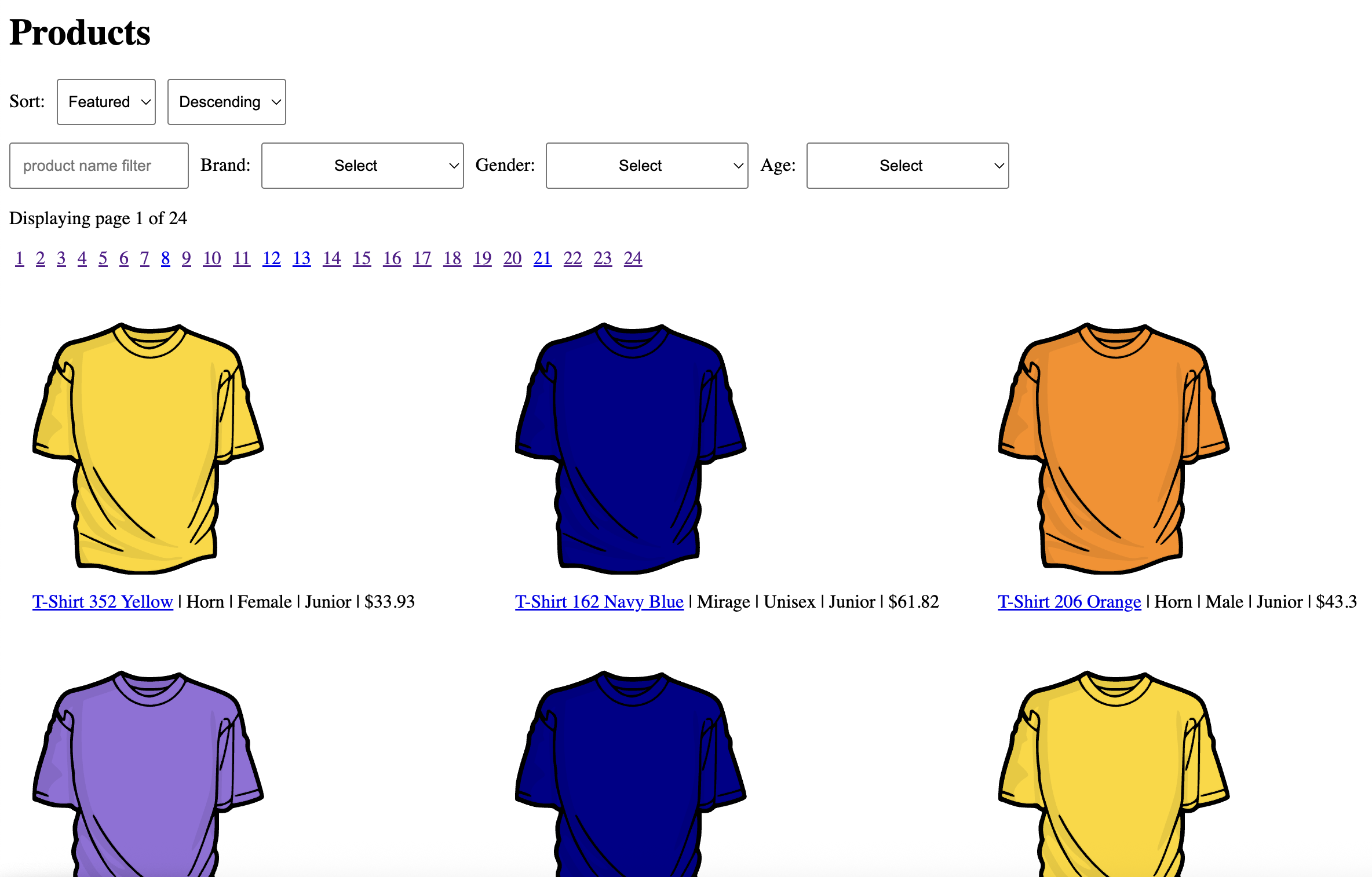

And, just in time for wroclove.rb 2026, Glimmer DSL for Web now has official Rails 8 setup instructions.

I am very grateful for having had the opportunity to conduct a workshop at wroclove.rb 2026, and I am very appreciative of their mission "We want to confront ideas" as they lived up to it 100%! This is a very good example of how a Ruby conference oughta be (not an echo chamber that runs away from any ideas that threaten the Rails Frontend Development status quo)! I thank the wroclove.rb 2026 staff for the nice letter and cookies they shared with me at the conference.


Feedback at the end of the workshop was all positive. Attendees were very excited for the simplicity and productivity benefits of Glimmer DSL for Web and Frontend Ruby over JavaScript! One attendee described the project's Ruby Frontend approach as very promising. Another attendee mentioned that he thinks React.js is absolutely horrible and normally uses Vue.js, but is happy to have discovered a Ruby Frontend alternative that is better than both React.js and Vue.js. 

That said, after the workshop, I received one piece of negative feedback from an attendee who tried to set up Glimmer DSL for Web in a new Rails web app. He said that Glimmer DSL for Web was difficult to set up in a Rails web app as it requires about 10 manual steps. I heard you loud and clear! I will work on automating setup instructions behind a single Rails generator command before releasing version 1.0.0. In the meantime, if anyone wants this to be ready sooner, you are welcome to contribute the solution in a GitHub Pull Request.

Note that in real projects, I recommend that Ruby devs try to solve their problems pragmatically by exploring a spectrum of solutions instead of immediately jumping into a Frontend Development approach, but we are intentionally building everything as a Frontend solution in this workshop for learning purposes. 

Normally, I recommend that Ruby devs explore these solutions by order of sophistication:

  1. Pure Rails Backend with Turbo if there are no Frontend interactions
  2. Pure Hotwire if there are a few Frontend interactions that can be driven completely from the Backend
  3. Hotwire + Stimulus if there are only a few custom Frontend interactions on top of basic Hotwire behavior, no more than 10 Frontend interactions.
  4. Glimmer DSL for Web when there is a need to build many Frontend interactions (over 10), build Frontend-local interactions that are NOT driven by the Backend (e.g. a painting app, a diagraming app, a very elaborate Frontend-heavy configuration app that does NOT need intermediate configuration steps to be driven by the Backend, etc...), or build Frontend interactions that are so sophisticated that they warrant reaching for a JS library like Angular/React/Vue/Svelte/Ember (Glimmer DSL for Web enables Ruby devs to build any React/JS feature in half the time or less and with about half the code, albeit much simpler Ruby code)
By the way, Glimmer DSL for Web is 100% free and open-source. I make $0 on this project. I spent many nights and weekends working on this project to solve Frontend code maintainability and productivity problems at my job and to offer a free contribution to the Ruby community that rescues it from dependence on JS libraries like React.js and enables it to go Ruby all the way in both the Frontend and Backend. If one truly believes Ruby is the best dynamically typed language out there (e.g. compared to Perl, Python, JavaScript, etc..), then they oughta demonstrate that belief with actions, not just words (words are a dime a dozen). That's by using Ruby everywhere it has the potential to offer the best solution possible for customers. 

Happy learning!

Tuesday, March 17, 2026

Glimmer DSL for Web 0.8.3 Preventing Components from Shadowing HTML Elements

Glimmer DSL for Web (Fukuoka Award Winning Ruby-in-the-Browser Frontend Framework for Rails) had a new release in version 0.8.3, which now raises an exception plus a correction hint if the user attempts to define a component or a component slot with a name that shadows an existing HTML element.

For example, suppose a developer defines a Glimmer Web Component class called `Input`, which would automatically generate the `input` keyword for use in the Ruby HTML DSL:

class Input

  include Glimmer::Web::Component   

  markup {

    h1 { "Hello!" }

  }

}

This would normally shadow the HTML input element, preventing the user from being able to use HTML input as in this code:

input(type: 'text', id: 'name', placeholder: 'John Doe')

Instead, input now can only be used according to the component definition (which currently defines zero attributes):

input

This renders <h1>Hello!</h1> as per the Glimmer Web Component definition above. Of course, this is a contrived example as normally, an input component would have some form of inputting behavior, but for the sake of this example, let's imagine that it just renders an h1.

In version 0.8.3, Glimmer DSL for Web now raises an exception if the developer attempts to shadow an existing HTML element:

Cannot define the Glimmer::Web::Component class "Input" because it shadows the HTML element "input"! Either rename the class (e.g. "MyAppInput") to avoid conflicting with an existing HTML element name or nest it within a namespace module/class (e.g. "MyApp::Input")!

So, the developer can happily rename the component:

class AcmeInput

  include Glimmer::Web::Component   

  markup {

    h1 { "Hello!" }

  }

}

Or, the developer can happily namespace the component:

module Acme

  class Input

    include Glimmer::Web::Component   

    markup {

      h1 { "Hello!" }

    }

  }

end

That way, the user can now continue to use standard HTML input in addition to the new input components:

div {

  acme_input # the renamed class version

  acme__input # the namespaced class version (double-underscores in place of ::)

  input(type: 'text', id: 'name', placeholder: 'John Doe') # standard HTML input

}

The same sort of safety harness has been implemented for Component Slots as well.

Glimmer on!!! 

Friday, July 11, 2025

Glimmer Web Components (+ Championship Win & General Recipe for Success)

Before I get into the blog post's main subject, I'd like to mention that I recently won the 2024-2025 TGIF Curling League championship with my Curling team (Brooms Up) at the Royal Montreal Curling Club. I brought a championship trophy back home as a result. 

Team "Brooms Up" celebrating the championship win!

Andy Maleh (me) holding the TGIF League Curling Championship trophy (and a Hockey stick beer mug)!

Andy Maleh (me) tossing cheers with others at the Curling club!

It is interesting to note that I only learned the sport of Curling 2.5 years ago (though I've known it as a weird sport that shows up on TV for many years before). So, to win a league championship in Curling this soon (finishing as the 1st team in 14) is a testament to having been able to transfer my general recipe for success from Software Engineering into Sports! In fact, as a result of this recent success in Sports, I have spent the last 3 months learning a new sport that I have always loved, but never played much (I only did a couple of leagues in it over 20+ years) and never played well: Baseball. Hitting a ball in Baseball is known as the most difficult thing to do in sports! I have been very busy the last few months taking classes and participating in a summer league for the easy version of Baseball known as Softball. Yesterday, I caught my first fly out ever! A few weeks ago, I caught my first pop out ever! Before that, I was able to hit my first line drive ever! 

To summarize my "General Recipe for Success" (whether in Sports or Software Engineering):

  • Learn the basics from the experts by taking classes with them (including doing any assigned homework): In Sports, I simply took classes at a Curling club to learn Curling and classes at a Batting Cage / Softball / Baseball Store to get started with Softball. In Software Engineering, I did a 4-year Bachelor's degree in Computer Science and a 2-year Master's degree in Software Engineering.
  • Practice alone: In Curling, my alone practice happened by arriving early to games or booking practice sessions at the Curling club, and spending time practicing the Curling delivery stance and Curling shots. In Softball, my alone practice has been happening by arriving 45 minutes early to every game and spending that time practicing the batting stance and flow, batting with a batting tee, and throwing a Softball up vertically to practice catching pop ups at different locations. In Software Engineering, my alone practice happened by building open-source software projects while exploring interesting Software Engineering ideas that I wished existed, and by testing my learnings from my university education by building my own computer programs to satisfy some of my own needs (e.g. in college, I built a calculator that figured out when future level-ups would happen in an RPG video game based on experience points by looking at past level-ups).
  • Practice with others while humbly asking them for feedback and help: In Curling, I practiced with other people on my league Curling team by booking a Curling practice session together and having the team's "Skip" (best player on the team who plays the most difficult position) watch us and correct us while we tried various Curling shots and sweeping methods. In Softball, I practice with others by arriving early to games to play catch with others, practice fielding, and practice pitching and/or batting. I let experienced players watch my errors and correct them during practice, humbly accepting their feedback and deferring to their expertise. In Software Engineering, I practiced with others by collaborating with other people on open-source software projects, doing book clubs and experimenting with book learnings in code, and asking coworkers for feedback in code reviews while accepting correction and learning from it. In my early years as a Junior Software Developer, I asked experienced Developers to teach me practical principles in computer programming.
  • Watch the experts: In Curling, I watch every Curling competition on TV that I could think of (in Canada, it's the Grand Slam of Curling, which happens 5 times a year, the Brier's, which happens once a year, and the World Curling Championship) and I watch Curling games at my local Curling club played by other members. In Baseball, I watch every season's Major League Baseball games on TV (Let's Go Red Sox) and I sometimes watch Softball games in my Softball league that happen before my team's games or afterwards. In Software Engineering, I read open-source software code online and I read old legacy code written by experts at my company to learn from it. I also observe the features of various pieces of Software that I use, including paying attention to the usability and user experience.
  • Communicate and collaborate well with your team (including having retrospectives about team performance): As they say, Teamwork Makes the Dream Work! In Curling, our Skip (i.e. captain) gave us very clear instructions for what to do every game. Additionally, he discussed what went right and wrong after every game so that we would all learn from our mistakes and do better next time. In Softball, my team captain and 1st base / 3rd base coaches give us clear instructions of how to play every game. Moreover, after games are done, we have retrospectives about what went wrong and what could be improved by next game. In Software Engineering, my teams favour over-communication instead of stingy communication because saving a few seconds here and there could result in days, weeks, or months that are wasted due to miscommunication. Additionally, we hold regular retrospectives in which we discuss what went right and wrong since the last retrospective. And, we often hop into impromptu meetings when extra communication is needed to ensure better work on a problem.

Now, let's get into the main topic of the blog post. I would like to announce glimmer-web-component as a new Ruby gem that provides a collection of reusable Glimmer Web Components for Glimmer DSL for Web (Ruby on Rails Web Frontend Framework), which were extracted from real Rails web applications. Of course, they are fully customizable with component options and standard CSS/SCSS. 

Version 0.1.0 of the Ruby gem ships with the first Glimmer Web Component: Multi Checkbox Dropdown. It was extracted from my current work Rails web app at Eltropy Canada (formerly Lexop, which got acquired by Eltropy in 2025).

GitHub: https://github.com/AndyObtiva/glimmer-web-components 


Using the Multi Checkbox Dropdown is as easy as utilizing the Ruby keyword `multi_checkbox_dropdown` in the Ruby HTML DSL. At minimum, it takes a `values` keyword argument to figure out what options to display to the user.


Of course, to be able to do anything useful with the user selection, one would have to hook into the `on_change` listener, which takes a Ruby block that receives `selected_values`. 


But, it's even simpler to just rely on bidirectional data-binding. selected_values are automatically pre-populated from @some_presenter.status_filters and stored back on @some_presenter.status_filters upon user selection.


Finally, it is possible to customize the component with many options:


Below is the full list of options, which are defined in the `multi_checkbox_dropdown` Glimmer Web Component code:

Happy Glimmering!

Friday, January 24, 2025

Glimmer DSL for Web Wins in Fukuoka Prefecture Future IT Initiative 2025 Competition

Glimmer DSL for Web (Ruby Web Frontend Framework) won an award in the Fukuoka Prefecture Future IT Initiative 2025 competition after I presented it to Yukihiro Matsumoto (the creator of Ruby) and other Fukuoka competition judges earlier this week on January 21, 2025! It's official! Matz approves of Glimmer DSL for Web!!!

Award Announcement: https://digitalfukuoka.jp/news/info/528/

MoneyForward Award Certificate:

Personal Letter from Matz (the creator of Ruby):

GitHub Repository for Glimmer DSL for Web (Ruby Web Frontend Framework): 


Slides for Glimmer DSL for Web Fukuoka Prefecture Future IT Initiative 2025 Presentation (10-min):


Thanks to the maintainers of Opal Ruby (Fukuoka Ruby 2023 Award Winner) for making it possible to build something as amazing as Glimmer DSL for Web today! You guys totally rock!!!

Thanks to everyone who attended my first talk about Glimmer DSL for Web at the Montreal.rb Ruby Meetup on March 6, 2024 last year as you guys literally witnessed history in the making! This is similar to discovering Ruby in the early days of Rails in the mid-2000s, but on the Frontend instead of the Backend. A couple of weeks ago, I got approval by my managers at work to start using Glimmer DSL for Web in my work Rails web app and to explore it as a replacement for React.js. So far, the results have been absolutely amazing! Truly, I feel a 200% improvement in productivity, maintainability, simplicity, and code readability in Ruby Frontend code compared to using plain JavaScript or React.js. I look forward to the bright future of Ruby in Frontend Development of Rails web applications, as enabled by Glimmer DSL for Web, now a Fukuoka Award Winning project! 


First Endorsement of Glimmer DSL for Web

I am happy to announce that I received my first endorsement of Glimmer DSL for Web (Ruby-in-the-Browser Web Frontend Framework):

"I'd like to endorse Andy Maleh’s work (Glimmer DSL for Web). I got introduced to it at RubyConf 2024 and have been playing around with it pretty successfully. What I have found most interesting is that I have been writing inside of a rails app, where I have been running the same code for models and presenters inside of MRI rspec. That way I can write tests that verify behavior of the presenters and models and still see them run successfully in the browser. That allows me to have a very nice cycle of refactoring and being confident in my changes without even running it in browser. I just assume that the binding will work and it usually works perfectly." - Steve Tuckner


Tuesday, January 07, 2025

Glimmer DSL for Web Now Officially Supports Rails 7.1 & 7.2

Glimmer DSL for Web (Ruby-in-the-Browser Web Frontend Framework) version 0.6.4 has been released! It now officially supports Rails 7.1 & 7.2 (Rails 8 support is planned for the future).

GitHub: https://github.com/AndyObtiva/glimmer-dsl-web

RubyGem: https://rubygems.org/gems/glimmer-dsl-web/versions/0.6.4


Happy Glimmering!

Thursday, December 26, 2024

Saturday, October 19, 2024

Glimmer DSL for Web Component Custom Event Listeners / Component Slots / Default Slot

Glimmer DSL for Web (Ruby-in-the-Browser Web Frontend Framework) recently added support for Component Custom Event Listeners, Component Slots, and Default Slot in the 0.5.x & 0.6.x version releases. The new samples Hello, Component Slots!, Hello, Component Listeners!, and Hello, Component Listeners (Default Slot)! have been added as well and can be played around with in an online hosted Rails Sample Selector web app (the app takes a while to load because of cheap hosting, but once it loads, it is fast in the Frontend).

Component Slots is a feature that enables consumers of a component (e.g. address form) to contribute visual elements in one or multiple slots within the component (e.g. address form header and footer), thus facilitating extension of components following the Open/Closed Principle. The consumer code would just open a block matching the component slot name inside the content block of the consumed component.

Hello, Component Slots! is a new sample that demonstrates Component Slots. Notice how the 2 address forms are augmented with a header and footer inserted within their content.


Component Custom Event Listeners is a feature that enables component consumers to add listeners for custom events that are specific to certain components. Those events can be declared at the top of a component class via the `events :event1, :event2, ...` method. For example, an accordion component can support `on_accordion_section_expanded` and `on_accordion_section_collapsed` custom event listeners (via `events :events :accordion_section_expanded, :accordion_section_collapsed`), which consumers could hook into via `on_eventxyz` blocks in order to do some work when those events fire.

Hello, Components Listeners! is a new sample that demonstrates Component Custom Event Listeners with an `accordion` component that has expandable/collapsable sections. Each AccordionSection supports on_expanded and on_collapsed event listeners, and the full Accordion supports on_accordion_section_expanded and on_accordion_section_collapsed event listeners.


Default Slot: If a Software Engineer knows that a specific component slot will be the one used the most for a certain component (e.g. a slot for inserting content into an accordion), they can designate it as the default slot. That way, by simply adding content inside the content block of a consumed component, it will get added automatically to the default slot.

Hello, Component Listeners (Default Slot)! leverages this feature to simplify the consumer code for the AccordionSection component section_content slot in the Hello, Component Listeners! sample.


Friday, October 11, 2024

JavaScript is a disease! Ruby is the cure!

In a recent Ruby meetup, I called JavaScript a disease! It is true! Especially, when comparing JavaScript code to much better, more elegant, and more readable Ruby code! JavaScript looks like ugly smelly mold by comparison. Once you see it, you can never unsee it! That's why I wouldn't touch JavaScript with a ten foot pole if I can help it. I would use Frontend Ruby instead (e.g. Opal Ruby, WASM, or Ruby2JS). Opal Ruby can usually be setup in about 10 minutes in a Rails app (https://github.com/opal/opal-rails), and it yields smaller downloadables than WASM. I am not sure why anyone in 2024 would go through the Hell of JavaScript in their otherwise pristine Ruby on Rails codebase instead of actually entering Heaven by using Frontend Ruby! Opal Ruby has won a Fukuoka Ruby 2023 Award and supports Ruby 3.1 with the ability to use any pure Ruby gems in the Frontend by simply including them in Gemfile. That removes the need for a complicated JavaScript bundling beast like Webpack. In the past, I might have advocated for still using JavaScript in smaller apps, but the barrier of integrating modern Ruby into the Frontend of Rails applications has become so non-existent with Opal, there are no more excuses for using JavaScript in a Ruby on Rails codebase. 

Yahuda Katz mentioned in his keynote speech at RailsConf 2014 (https://youtu.be/9naDS3r4MbY?t=1195), which borrowed ideas from Steve Jobs, that by continuously building more floors for the lower levels of a building in the form of a framework and a community of open-source projects, we enable developers to start development at higher and higher levels than they would have been able to otherwise, thus helping them leapfrog earlier ways of development in ever increasing productivity! In 2024, Frontend Ruby (e.g. Opal) is the next floor level that enables Ruby Software Engineers to start at a higher level of development with much higher productivity and maintainability. I strongly believe that anyone who is not using Frontend Ruby in 2024 is at least half as productive as those who are using Frontend Ruby in their Rails development, regardless of whatever framework they are using. I don't care if someone is enamored by some "cool JavaScript framework xyz"; try to implement that framework in Ruby, and IT WILL BE EVER COOLER AND BETTER IN RUBY! Or, in certain instances, you will discover that Ruby is so much simpler than JavaScript, YOU DO NOT EVEN NEED the "cool" JavaScript frameworks as they are UNCOOL IN RUBYLAND! Glimmer DSL for Web is one Frontend Ruby Framework example that demonstrates the unique simplicity/readability of Ruby that is unmatched by cryptic/too-clever JavaScript code: https://github.com/AndyObtiva/glimmer-dsl-web

JavaScript is a disease! Ruby is the cure! Don't be part of the problem by using JavaScript in Ruby on Rails codebases! Be part of the solution by using the language we all love, Ruby, isomorphically in Ruby on Rails applications in 2024 and beyond! 

Friday, August 30, 2024

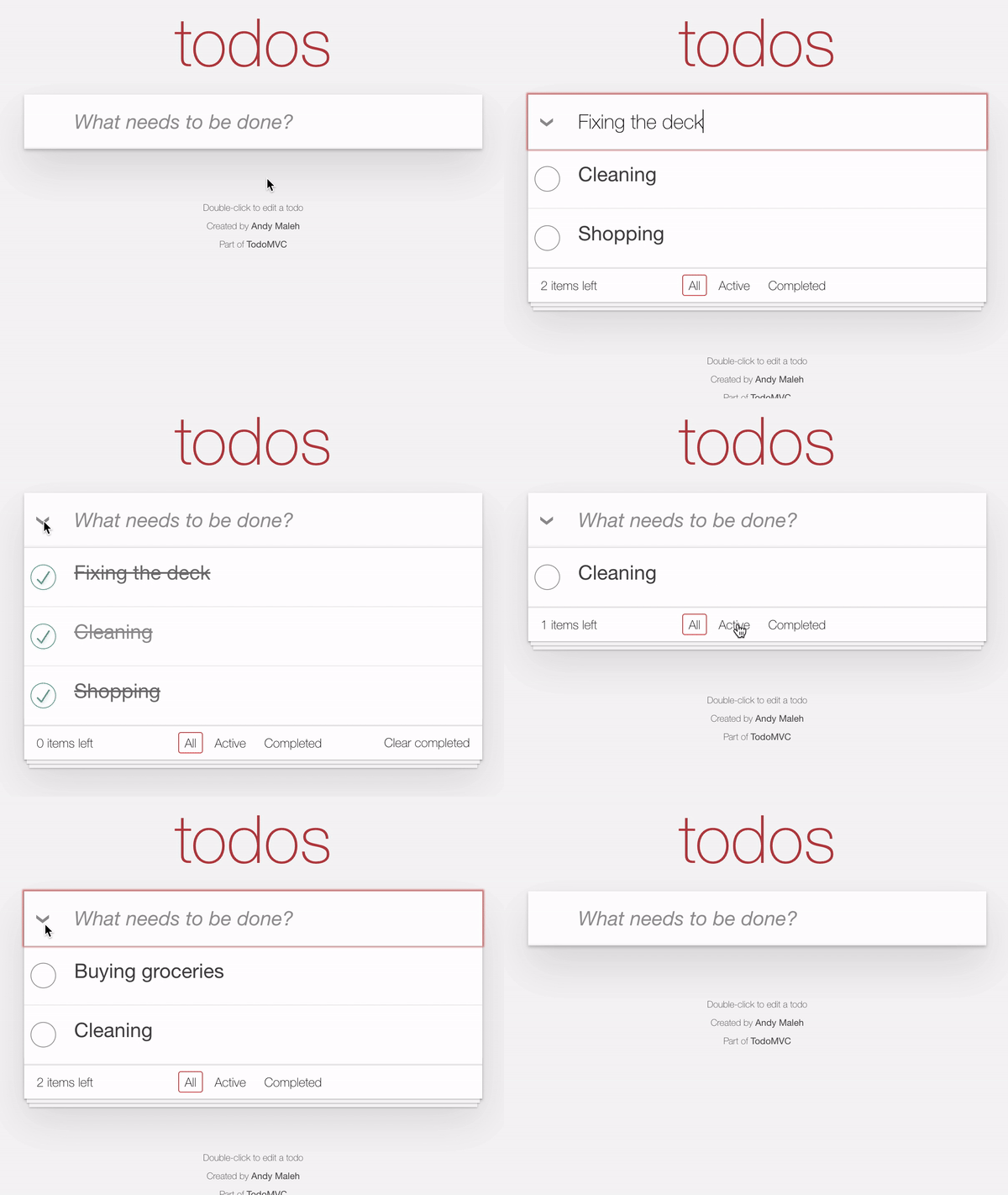
Todo MVC Ruby Edition w/ Component Style Blocks, Inline-Style Data-Binding, and Class-Inclusion Data-Binding

Todo MVC Ruby Edition is a Rails sample app that was built with Glimmer DSL for Web using Frontend Ruby. It was initially documented in the blog post "Todo MVC Ruby Edition Is the One Todo MVC To Rule Them All". It has been refactored, simplified, and optimized significantly (all operations happen instantly now), relying on new Glimmer DSL for Web features, such as Component Style Blocks, Inline-Style Data-Binding, and Class-Inclusion Data-Binding.

You can access an online-hosted version of Todo MVC Ruby Edition here: 

https://sample-glimmer-dsl-web-rails7-app-black-sound-6793.fly.dev/


Glimmer DSL for Web 0.4.0 - 0.4.4 features:

1) Element Inline-Style Data-Binding: this enables simple data-binding of fine-grained CSS inline-styles (e.g. `background-color`) to Model/Presenter attributes (in the past, only the course-grained style attribute was data-bindable).

Example:

The code below is using Unidirectional Data-Binding (left-arrow) to declaratively bind the value of the style width for example to the width attribute on a button_model object.

button('Submit') {

  style(:width) <= [button_model, :width]

  style(:height) <= [button_model, :height]

  style(:font_size) <= [button_model, :font_size]

}

2) Element Class-Inclusion Data-Binding: this enables simple data-binding of fine-grained CSS classes (e.g. `active`) to Model/Presenter boolean attributes (in the past, only the course-grained class attribute was data-bindable).

Example:

The code below is using Unidirectional Data-Binding (left-arrow) to declaratively bind the value of the 'pushed' CSS class for example to the pushed attribute on a button_model object. In the second line, we add an on_read converter that would negate the value on read from the Model before writing to the View element 'pulled' CSS class.

button('Toggle') {

  class_name(:pushed) <= [button_model, :pushed]

  class_name(:pulled) <= [button_model, :pushed, on_read: :!]

}

3) Ability to specify element style attribute value as a hash of CSS properties instead of a plain String.

Example:

div(style: {display: :grid, grid_auto_columns: '80px 260px'})


4) Ability to specify CSS classes as an array of String's or Symbol's instead of a plain String.

Examples

li(class: [:completed, :editing, 'todo-item'])


5) Glimmer Web Component Style Block: a style block enables declaring common styles for a component that apply to all instances of the component, using Glimmer DSL for CSS. It is an optional feature that adopts the new recommendation to co-locate styles with components to speed up productivity and maintainability. It is similar to the Styled Components approach that React developers rely on, except it is implemented in Ruby, thus providing the unique benefit of not forcing developers to switch context between multiple languages, thus improving productivity/maintainability. But, if developers prefer relying on separate CSS/SCSS files, that is fully supported as well. When a style block is declared in a component, behind the scenes, Glimmer DSL for Web generates a <style> element that is automatically included in the <head> element of the page for better performance, and it is automatically removed from the head element upon removing the last instance of a component on a webpage. Since the style block applies to all instances of a component, it is evaluated against the component class, and can leverage class methods if needed.

Example:

class TodoMvc

  include Glimmer::Web::Component


  before_render do evaluated against the component instance

    @presenter = TodoPresenter.new

  end


  after_render do evaluated against the component instance

    @presenter.setup_filter_routes

  end


  markup evaluated against the component instance

    div has CSS class 'todo-mvc', derived from component class name by convention

      section(class: 'todoapp') {

        new_todo_form(presenter: @presenter)


        todo_list(presenter: @presenter)


        todo_filters(presenter: @presenter)

      }


      todo_mvc_footer


      on_remove do

        @presenter.unsetup_filter_routes

      end

    }

  }


  style { evaluated against the component class

    r('body, button, html') {

      margin 0

      padding 0

    }


    r('button') {

      _webkit_font_smoothing :antialiased

      _webkit_appearance :none

      appearance :none

      background :none

      border 0

      color :inherit

      font_family :inherit

      font_size '100%'

      font_weight :inherit

      vertical_align :baseline

    }


    r("#{component_element_selector.todoapp") # embeds .todo-mvc before .todoapp

      background '#fff'

      margin '130px 0 40px 0'

      position :relative

      box_shadow '0 2px 4px 0 rgba(0, 0, 0, 0.2), 0 25px 50px 0 rgba(0, 0, 0, 0.1)'

    }


    media('screen and (-webkit-min-device-pixel-ratio:0)') {

      r('body') {

        font "14px 'Helvetica Neue', Helvetica, Arial, sans-serif"

        line_height 1.4.em

        background '#f5f5f5'

        color '#111111'

        min_width 230

        max_width 550

        margin '0 auto'

        _webkit_font_smoothing :antialiased

        font_weight '300'

      }

    }

  }

end


Below is the updated code of Todo MVC Ruby Edition. As mentioned before, it has been refactored, simplified, and optimized significantly. 


Happy learning!