Showing posts with label LibUI. Show all posts

Sunday, November 30, 2025

DB GUI 0.3.0 & Glimmer DSL for LibUI 0.13.1 Released

DB GUI 0.3.0 & Glimmer DSL for LibUI (Ruby Desktop Development Cross-Platform Native GUI Library)  0.13.1 have been released. DB GUI now supports remembering multiple database profiles, including which one was last selected. Glimmer DSL for LibUI now supports combobox items data-binding. In the past, it supported combobox selected_item data-binding while assuming that the master items list is static (the older version of the C LibUI library had that limitation). After the last release, it now enables dynamically updating the items of a combobox as needed (the newer version of the wrapped C LibUI library now supports dynamic combobox items). This was useful for implementing the latest version of DB GUI as it will automatically add an item to a combobox's items upon saving a new database profile.

GitHub Projects:

    Ruby Gems:

    Screenshots to illustrate the latest changes: 


    DB GUI combobox with items data-binding:

    combobox { |me|
      label 'Selected Config:'
      items <= [db_presenter, :dbs, on_read: ->(dbs) { dbs.map(&:name) }]
      selected_item <=> [db_presenter, :selected_db_name]
      enabled <= [db_presenter, 'selected_db.connected', on_read: :!]
    }

    items are data-bound unidirectionally to the names of the database profiles (dbs) in the presenter. That means, if the user fills in the database profile config form and saves, the items of the combobox are automatically amended.

    Happy Glimmering!

    Wednesday, December 25, 2024

    Glimmer Hangman (RubyConf 2024 Hack Day App)

    During the RubyConf 2024 Hack Day Event for Glimmer DSL for LibUI, which was associated with the RubyConf 2024 workshop "How To Build Basic Desktop Applications in Ruby", I started the implementation of Hangman, the word game, in Ruby as a GUI desktop app. Well, I am happy to announce that I finally worked on it again yesterday and completed it, releasing version 1.0.0! And, it's implemented with some of the most amazing Ruby code! Just install the `glimmer_hangman` Ruby gem and run the command `hangman` and you'll have the game running on your machine instantly!

    Project GitHub:

    https://github.com/AndyObtiva/glimmer_hangman

    Ruby Gem:

    https://rubygems.org/gems/glimmer_hangman

    I am including the project README and code below.

    Merry Christmas!

    Project README:

    Project Code:

    app/glimmer_hangman/model/game.rb

    app/glimmer_hangman/view/hangman.rb

    app/glimmer_hangman/view/hangman_scene.rb

    app/glimmer_hangman/view/hangman_guess.rb

    app/glimmer_hangman/view/hangman_guessed_letters.rb


    Thursday, December 19, 2024

    Video for RubyConf 2024 Workshop "How To Build Basic Desktop Applications in Ruby"

    The video for my RubyConf 2024 Workshop "How To Build Basic Desktop Applications in Ruby" has been released:

    https://www.youtube.com/watch?v=TTSqRdTVtDY

    This video is not only useful to Ruby Developers who want to learn how to build basic desktop applications in Ruby with the Fukuoka Ruby 2022 Award Winning Glimmer DSL for LibUI (Prerequisite-Free Ruby Desktop Development Cross-Platform Native GUI Library), but also to Rails Developers who want to build Rails productivity tools as Ruby gems (e.g. the rails-gui gem offers a user-friendly fast GUI for rails routes), leverage all the awesomeness of Glimmer in the Frontend of Rails applications 🤯 (in the workshop, I mention a new Glimmer DSL for Web that has all the features of Glimmer desktop gems tailored for Rails Frontend Development), and improve their skills in Object Oriented Programming, Software Architecture, and Software Design in general, like how to apply MVC (Model-View-Controller) & MVP (Model-View-Presenter) correctly to improve productivity and maintainability, instead of doing things the Rails MVC way, which is not completely correct. 

    Here are some interesting requests I received from attendees at RubyConf 2024:

    • Write a book about how to build GUI Desktop Applications with Ruby (I actually started writing such a book about 4 years ago, but then got pulled into building Glimmer DSL for LibUI and winning a Fukuoka Ruby 2022 Special Award for it; the book is still a great idea! I will keep it in mind.)
    • Build a code editor that supports live GUI updates (I blogged more details about this topic here: https://andymaleh.blogspot.com/2024/12/the-dcr-kids-programming-language.html)
    • Build a Glimmer DSL for DragonRuby to simplify Game Development with a Ruby DSL

    Also, during the follow-up RubyConf 2024 Hack Day Event, we got to build Hangman and a Hockey joke AI app.

    Happy learning!

    Here is the GitHub repository with the workshop code exercises and test solutions:

    https://github.com/AndyObtiva/how-to-build-desktop-applications-in-ruby/tree/rubyconf2024

    Here are the workshop presentation slides:

    https://docs.google.com/presentation/d/e/2PACX-1vSAaFLYeyolSy2Qe2tW0djv78tA-m120i4DJyaJ4qAHoWpv5Xppn_-yIpg4_IAGntetZkRDkkuT2zXN/pub?start=false&loop=false&delayms=60000&slide=id.g140fe579a5a_0_0


    Sunday, December 08, 2024

    Montreal.rb Hack Night Solutions for Hunt The Wampus

    In November and December of 2024, Montreal.rb hosted 2 Ruby Hack Night meetups about building the historic computer game, Hunt The Wampus, which was a text-based adventure game developed by Gregory Yob in 1973.

    The Hack Night details are at this GitHub repository (you can look at Git branches for solutions):

    https://github.com/AndyObtiva/hunt_the_wampus


    I heard great feedback about the event from attendees of the Ruby meetup:

    - "This was very interesting!'

    - "It is great to change things up with a Hack Night instead of just having talks at every Ruby meetup!"

    - "It is very useful that this Hack Night gives people the option to build an app as a CLI, TUI, GUI, Web Backend, or Web Frontend. Even if people made one of those choices during the Hack Night, they can later build other versions of the app after the Ruby meetup."

    Here are demos of a couple of Ruby implementations of the game that were done in under 2 hours.

    Ruby GUI desktop app built using Glimmer DSL for LibUI:

    https://github.com/AndyObtiva/hunt_the_wampus/tree/solution-gui-glimmer-dsl-libui-text


    Ruby on Rails Web Frontend SPA built with Glimmer DSL for Web and Opal:


    Building a lo-fi prototype is a common Game Development practice. That's why the GUI version of Hunt the Wampus intentionally did not render graphics, yet text only, for representing the various objects and senses of the game. It can certainly be upgraded in the future with graphics if desired (Glimmer DSL for LibUI supports canvas graphics with the area control).

    It was pretty amazing to be able to take the Model layer Ruby code that worked in CRuby and reuse it successfully in Opal Ruby (Ruby 3.1 to JavaScript transpiler). That clearly demonstrated the superiority of the Frontend Ruby approach in Rails applications over JavaScript libraries like React or Vue because JavaScript does not support being able to reuse Ruby code directly in the Frontend when needed. Only Frontend Ruby (e.g. Opal or WASM) supports that, which saved a lot of development time for building Hunt The Wampus as a Web Frontend in a Rails web app given that the Model layer was already complete from a previous Hack Night event.

    Feel free to do the Hack Night exercises yourself by going through parts 1 and 2:

    Happy learning!


    Wednesday, November 27, 2024

    Code Exercises & Slides for RubyConf 2024 Workshop: "How To Build Basic Desktop Applications in Ruby"

    Below is the GitHub repo that contains the code exercises and slides of the RubyConf 2024 Workshop: "How To Build Basic Desktop Applications in Ruby". Everyone can go through them at their own time.


    GitHub:

    https://github.com/AndyObtiva/how-to-build-desktop-applications-in-ruby/tree/rubyconf2024

    Slides (Online):

    https://docs.google.com/presentation/d/e/2PACX-1vSAaFLYeyolSy2Qe2tW0djv78tA-m120i4DJyaJ4qAHoWpv5Xppn_-yIpg4_IAGntetZkRDkkuT2zXN/pub?start=false&loop=false&delayms=60000&slide=id.g140fe579a5a_0_0

    YouTube Video:

    https://www.youtube.com/watch?v=TTSqRdTVtDY

    Thanks to everyone who attended the RubyConf 2024 workshop and the follow-up Hack Day event.

    One of the attendees, Scott Werner, built an AI joke generator desktop GUI app with Glimmer in Ruby.


    And, a scaffolding of Hangman was generated at the Hack Day event too (you can star and watch the project to follow its development to completion): 

    Monday, September 23, 2024

    Laptop Instructions for RubyConf 2024 Workshop "How To Build Basic Desktop Applications in Ruby"

    My RubyConf 2024 2-hour workshop "How To Build Basic Desktop Applications in Ruby" has been added to the RubyConf schedule. It requires attendees to follow setup instructions on their laptops before attending the workshop to hit the ground running at the event. 

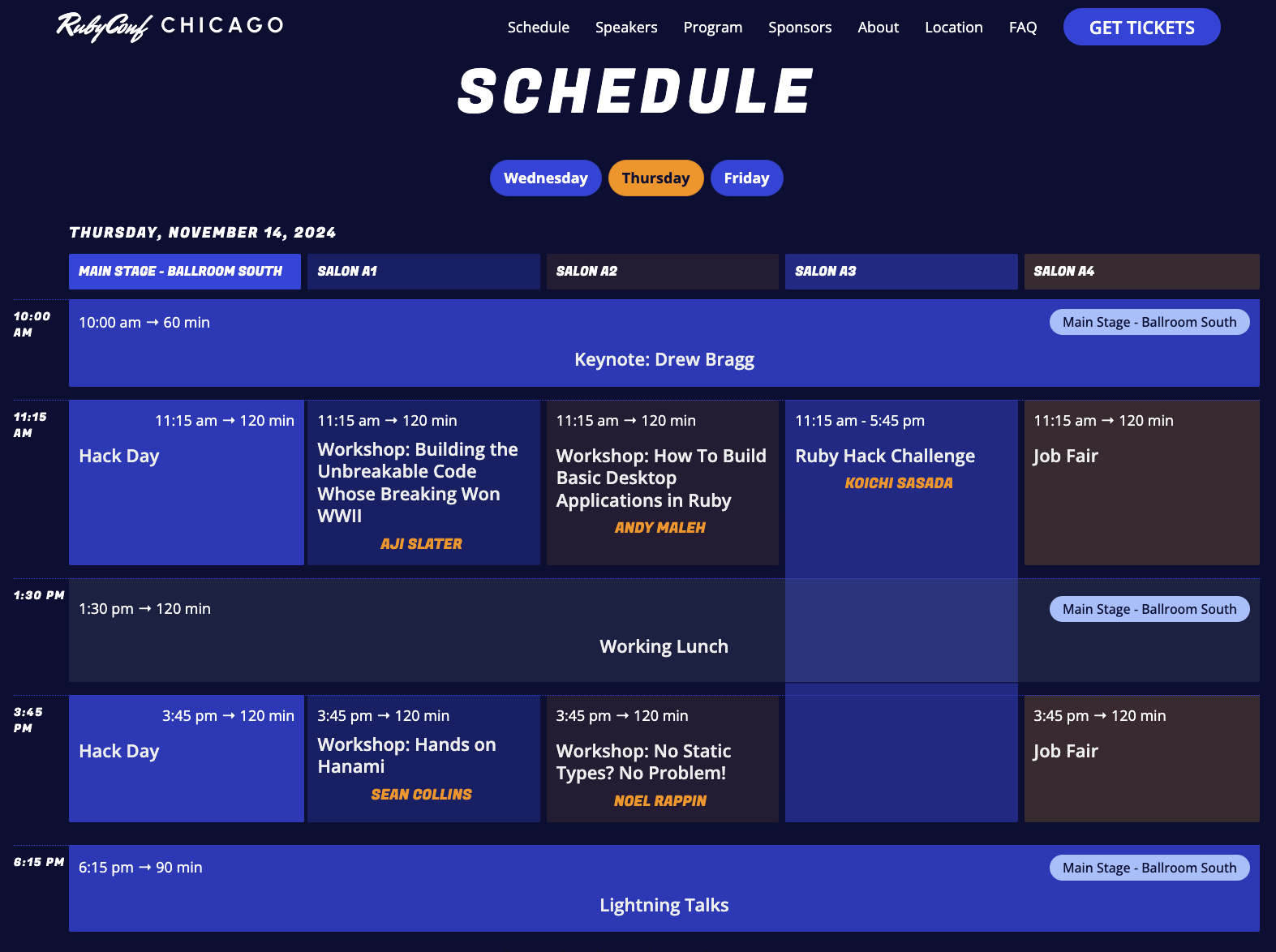
    The workshop will take place at "Salon A2" in the Hilton Chicago Downtown hotel (Chicago, Illinois, USA) on Day 2 (Thu, Nov 14, 2024) from 11:15am till 1:15pm. 

    Full workshop material will be published on the day of the workshop at the GitHub repository below, which in the meantime includes setup instructions that must be followed on your laptop before attending the workshop (please bring your laptop to the workshop):

    https://github.com/AndyObtiva/how-to-build-desktop-applications-in-ruby

    After lunch, the workshop theme will continue in a Hack Day event at "Main Stage - Ballroom South" from 3:45pm till 5:45pm, in which #RubyConf attendees could continue learning and playing around with Ruby desktop exercises, build desktop applications individually or in collaboration with others, and/or ask me questions about desktop development in Ruby.


    Wednesday, August 21, 2024

    RubyConf 2024 Workshop Accepted - How To Build Basic Desktop Applications in Ruby

    Glimmer will be returning to RubyConf in 2024 (Nov 13-15) at the Windy City (Chicago, Illinois, USA)! My RubyConf 2024 2-hour workshop proposal "How To Build Basic Desktop Applications in Ruby" has been accepted! 

    I listened to the feedback of attendees of my RubyConf 2023 2-hour workshop "How To Build Desktop Applications in Ruby" and cut down the material while simplifying it and eliminating initial setup time to avoid cramming 8 hours worth of teaching material in 2 hours (hence the change in the workshop title from "Desktop Applications" to "Basic Desktop Applications"). Instead, the new material is tailored to teaching in 2 hours with enough breathing room for everyone to play around with interesting Desktop Development concepts like Data-Binding/MVC/MVP while being able to ask questions comfortably. Also, the workshop description includes instructions for installing the Fukuoka Ruby 2022 Award Winning gem Glimmer DSL for LibUI in advance to ensure that conference attendees could hit the ground running when the RubyConf 2024 workshop begins.

    I leave you with the workshop title, description, and bio below. 

    See you at RubyConf 2024 (November 13-15, 2024).

    ---

    Title (2-hour Workshop): 

    How To Build Basic Desktop Applications in Ruby

    Description:

    Learn how to build basic desktop applications in Ruby with hands-on code exercises!

    Workshop outline (every step will involve a hands-on exercise or more):

    1. GUI Basics (Controls, Properties, and Listeners):
    2. Observer Pattern and MVC (Model-View-Controller) Software Architecture
    3. Data-Binding and MVP (Model-View-Presenter) Software Architecture
    4. Advanced Data-Binding

    This workshop will be conducted using Glimmer DSL for LibUI, the prerequisite-free ruby desktop development cross-platform native GUI gem that won a Fukuoka Ruby 2022 Special Award after getting judged by Matz, the creator of Ruby.

    Please install the latest version of the Ruby gem (run `gem install glimmer-dsl-libui`) and confirm it is working (run `glimmer examples`) in advance to hit the ground running when the workshop begins.

    Bio:

    Andy Maleh is a Fukuoka Ruby Winner, RubyConf/RailsConf Speaker, and MS in Software Engineering.

    Sunday, June 23, 2024

    Glimmer DSL for LibUI 0.12.0 Custom Control Component Slots

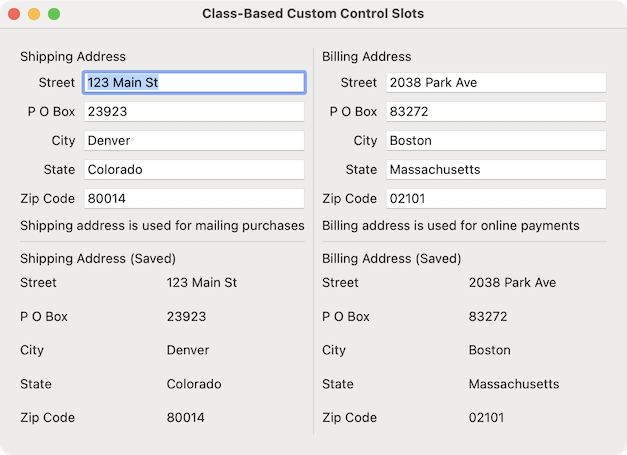
    Glimmer DSL for LibUI (Prerequisite-Free Ruby Desktop Development Cross-Platform Native GUI Library) version 0.12.0 ships with an exciting new feature called Custom Control Component Slots!!! Component Slots are containers that could accept content in different parts of a Custom Control component (e.g. an address_form Custom Control can have a header slot and a footer slot to display extra information about the address being entered, which consumers could fill in with any GUI controls). A new example has been implemented to demonstrate this feature: Class-Based Custom Control Slots. 

    Of course, Glimmer implements Component Slots with the simplest most declarative DSL syntax possible (as with all features of Glimmer), which does not require redundant declarations of slots in advance or a distinction between singular and plural slots, yet all slots are treated uniformly in the simplest way possible. In the past, if you opened a block in front of a Custom Control keyword and shoved content in it (e.g. `address_form { label('some text') }`), it got added to the bottom inside the Custom Control's top-level control (though there was a bug in that feature that was fixed in version 0.11.10). That was a good smart default as it allowed contributing Custom Control content by consumers without having to explicitly/manually specify where to insert `children` in the Custom Control. Glimmer just knew what to do by default. That said, it did not address all needs, like wanting to insert content in arbitrary places deep in a Custom Control's body hierarchy. Now, Software Engineers could allow consumers of Custom Controls to contribute content everywhere inside a Custom Control, not just inside the top-level control, with a very minimalistic declarative DSL syntax that greatly facilitates building highly customizable Custom Controls.

    I leave you with the Custom Control Component Slots feature documentation below.

    Glimmer on!!!

    P.S. In other news, somebody built Go in Ruby using Glimmer DSL for LibUI.


    Monday, January 01, 2024

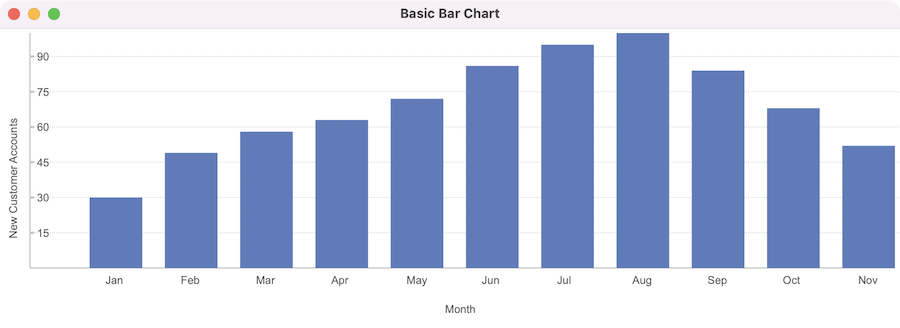
    Graphs and Charts 0.2.2 (Bar Chart for Glimmer DSL for LibUI)

    Graphs and Charts 0.2.x adds a new Bar Chart Custom Control for Glimmer DSL for LibUI (Prerequisite-Free Ruby Desktop Development Cross-Platform Native GUI Library) in addition to the existing Line Graph Custom Control.

    GitHub Repo: https://github.com/AndyObtiva/glimmer-libui-cc-graphs_and_charts

    Basic Bar Chart Example:

    Screenshot:


    Code:

    Glimmer On!!!

    Saturday, December 16, 2023

    Graphs and Charts 0.1.1 (Custom Controls for Glimmer DSL for LibUI)

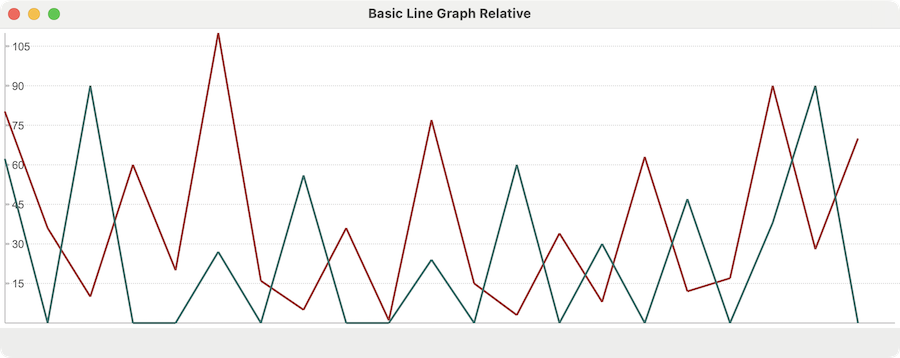
    Graphs and Charts is a new library for Glimmer DSL for LibUI (Prerequisite-Free Ruby Desktop Development Cross-Platform Native GUI Library) that aims at providing Custom Controls for rendering graphs and charts. In version 0.1.1, it supports Line Graph in a new `line_graph` Custom Control for rendering lines (1 or more) connecting points with different y-axis values along a time-based x-axis.


    Code Example:


    Happy Glimmering!

    Tuesday, November 14, 2023

    Slides & Code for RubyConf 2023 Workshop "How To Build Desktop Applications in Ruby"

    Thanks to everyone who attended my RubyConf 2023 2-Hour Workshop "How To Build Desktop Applications in Ruby". 

    I am happy the event's large ballroom filled up completely with attendees. For those who missed the event, I posted the presentation slides and code exercises (27 exercises) on GitHub. If you are at RubyConf 2023 and have further questions about the workshop, feel free to hit me up on the RubyConf 2023 Slack group or reach out to me via a Glimmer DSL for LibUI Issue or Glimmer Gitter Chat.

    Slides/Code GitHub Repo: 

    https://github.com/AndyObtiva/how-to-build-desktop-applications-in-ruby

    Embedded Slides:

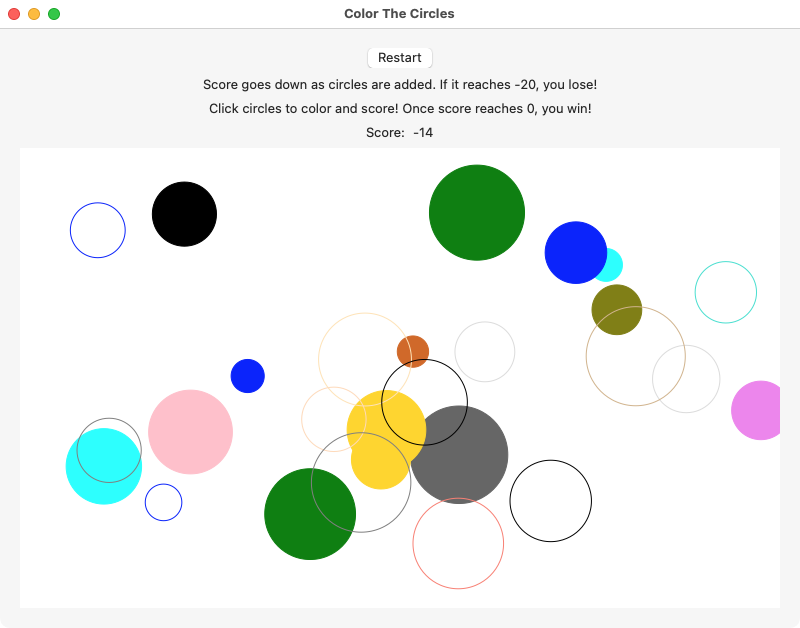
    After the workshop, I hosted a RubyConf 2023 Community Day Glimmer Desktop Hacking event. Thanks to everyone who joined me there too. The product of that Hacking session was the Glimmer DSL for LibUI Game App: Color The Circles, which was produced using Application Scaffolding and a refactoring of the original example included in Glimmer DSL for LibUI.

    https://github.com/AndyObtiva/color_the_circles

    Happy Glimmering!!!


    Friday, October 27, 2023

    Glimmer DSL for LibUI Custom Shapes

    Glimmer DSL for LibUI (Ruby Desktop Development Cross-Platform Native GUI Library) versions 0.10.1 & 0.10.0 ship with support for building and scaffolding Area Canvas Graphics Custom Shapes (with optional Gemification). Custom shapes represent higher-order graphical concepts, like `cube`, `cylinder`, and `uml_class`, that could be formed out of more rudimentary shapes like `rectangle`, `circle`, `bezier`, and `text`, to aggregate and simplify interaction with them as coarse-grained components in a desktop application. Custom Shapes improve productivity significantly through code reuse in graphical desktop applications that rely on Area Canvas Graphics, like UML Diagramming tools, Traffic Control Signalling apps, and games. When defining Custom Shapes, the Glimmer GUI DSL automatically grows with new keywords that represent new shapes like `cube`, `cylinder`, and `uml_class`. To do so, simply define classes matching the names of the shapes in standard Ruby class camelcase (e.g. `Cube`, `Cylinder`, and `UmlClass`) and mix in the `Glimmer::LibUI::CustomShape` module, and Glimmer will automatically augment its DSL with matching underscored keywords by convention (`cube`, `cylinder`, and `uml_class`). Custom Shapes enable dreaming up any aggregate visual concepts and implementing them as components in the same way we think about them.


    A Custom Shape can be scaffolded inside a Glimmer DSL for LibUI application with the `glimmer "scaffold:customshape[name,namespace]"` command. 

    Alternatively, a Custom Shape Gem can be scaffolded as its own separate project with the `glimmer "scaffold:gem:customshape[name,namespace]"` in order to facilitate sharing a Custom Shape across multiple desktop applications.

    A new example was included in Glimmer DSL for LibUI called Basic Custom Shape:

    Glimmer on!!!

    Sunday, October 22, 2023

    Glimmer DSL for LibUI Scaffolding + Snake Game

    Glimmer DSL for LibUI (Prerequisite-Free Ruby Desktop Development Cross-Platform Native GUI Library) versions 0.9.x include support for a new Glimmer Command, Application Scaffolding, Custom Component Scaffolding, Custom Component Gem Scaffolding, and more. These features greatly improve Software Engineering Productivity when building desktop applications with Glimmer DSL for LibUI. Glimmer Scaffolding could be thought of as the "Desktop Application" equivalent of Rails Scaffolding and the Rails Application Generator.

    Application Scaffolding enables automatically generating the directories/files of a new desktop GUI application that follows a cleanly decoupled MVC architecture and can be packaged as a Ruby gem that includes a script for running the app conveniently.

    In fact, I ate my own dog food and used the new Application Scaffolding feature to effortlessly scaffold a Glimmer Snake game (code is included near the bottom of this post):

    https://github.com/AndyObtiva/glimmer_snake

    This is the gemified app edition of the Snake game example that is included in Glimmer DSL for LibUI.

    Here is the Glimmer DSL for LibUI Glimmer Command guide (straight out of the project README), which covers all Scaffolding features:

    Here are the Glimmer Snake implementation classes that were added on top of the Glimmer DSL for LibUI Application Scaffolding following a cleanly decoupled MVC architecture:

    app/glimmer_snake/view/glimmer_snake.rb

    app/glimmer_snake/presenter/grid.rb

    app/glimmer_snake/presenter/cell.rb

    app/glimmer_snake/model/game.rb

    app/glimmer_snake/model/snake.rb

    app/glimmer_snake/model/vertebra.rb

    app/glimmer_snake/model/apple.rb

    Here is the Change Log of the 0.9.x version releases of Glimmer DSL for LibUI ordered from newest to oldest:

    0.9.7

    - Scaffold Custom Control Gem via `glimmer scaffold:gem:customcontrol[name,namespace]` (or alias: `glimmer scaffold:gem:cc[name,namespace]`)

    - List Custom Control Gems (expected name format: `glimmer-libui-cc-gemname-namespace`) via `glimmer list:gems:customcontrol[query]` (or alias: `glimmer list:gems:cc[query]`)

    0.9.6

    - Scaffold Custom Window Gem via `glimmer scaffold:gem:customwindow[name,namespace]` (or alias: `glimmer scaffold:gem:cw[name,namespace]`)

    - List Custom Window Gems (expected name format: `glimmer-libui-cw-gemname-namespace`) via `glimmer list:gems:customwindow[query]` (or alias: `glimmer list:gems:cw[query]`)

    - List Glimmer DSLs via `glimmer list:gems:dsl[query]`

    0.9.5

    - Scaffold Custom Control via `glimmer scaffold:customcontrol[name,namespace]` (or alias: `glimmer scaffold:cc[name,namespace]`)

    0.9.4

    - Scaffold Custom Window via `glimmer scaffold:customwindow[name,namespace]` (or alias: `glimmer scaffold:cw[name,namespace]`)

    0.9.3

    - Application Scaffolding via `glimmer scaffold[app_name]` includes a Model layer

    0.9.2

    - Add `glimmer` commands `glimmer package:gem`, `glimmer package:gemspec`, and `glimmer package:clean`

    0.9.1

    - Scaffold an application via Glimmer Command: `glimmer scaffold[app_name]`

    - Hide unsupported Scaffolding tasks in Glimmer Command

    - Add missing Glimmer Command gem dependencies: `rake`, `rake-tui`, `text-table`, `puts_debuggerer`

    0.9.0

    - Support `glimmer` command to more conveniently run applications (`glimmer app_path`) and examples (`glimmer examples`)

    Happy Glimmering!

    Wednesday, September 27, 2023

    RubyConf 2023 How To Build Desktop Applications in Ruby (Workshop Accepted)

    My RubyConf 2023 workshop submission titled "How To Build Desktop Applications in Ruby" has been accepted! It will take place in San Diego, California, USA on Monday, November 13, 2023 at 10am PT. Workshop seating is limited, so please RSVP for your spot over here! This workshop expands on last year's RubyConf 2022 talk "Building Native GUI Apps in Ruby".

    RubyConf 2023 Workshop Details: 

    https://rubyconf-2023.sessionize.com/session/531448


    How To Build Desktop Applications in Ruby (2 hours):

    Learn how to build desktop applications in Ruby with hands-on code exercises! 

    Workshop outline (every step will involve a hands-on exercise or more):

    1. GUI Basics (Controls, Properties, and Listeners):

    2. MVC (Model-View-Controller) Software Architecture

    3. Data-Binding and MVP (Model-View-Presenter) Software Architecture 

    4. Advanced Data-Binding

    5. Area (Canvas) Graphics

    6. Drag & Drop

    7. Custom Components (Custom Controls, Custom Windows, Custom Shapes)

    8. Application Scaffolding

    This workshop will be conducted using Glimmer DSL for LibUI, the prerequisite-free ruby desktop development cross-platform native GUI gem that won a Fukuoka Ruby 2022 Special Award after getting judged by Matz, the creator of Ruby.

    Monday, August 28, 2023

    Tutorial: Ruby GUI with Glimmer (by Mattias Velamsson)


    Mattias Velamsson recently shared a beginner's tutorial for making a GUI (Graphical User Interface) in Ruby titled "Ruby GUI with Glimmer". It provides a step-by-step code walkthrough that produces a full-fledged web-API-driven table-based business application. It uses various gems and APIs like glimmer-dsl-libui,  dotenv, Net::HTTP, URI, JSON, and the Exchange Rates Data API.

    Tutorial Link for Ruby GUI with Glimmer by Mattias Velamsson:

    https://dev.to/smackdh/ruby-gui-with-glimmer-2fkh

    Happy Learning!

    Sunday, July 09, 2023

    Glimmer DSL for LibUI Composite Shape

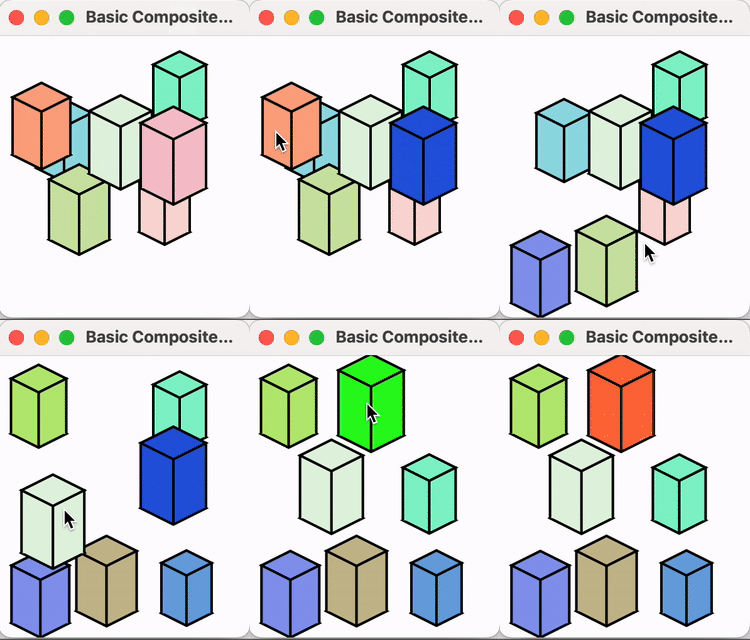
    Glimmer DSL for LibUI 0.8.0 (Fukuoka Award Winning Ruby Desktop Development Cross-Platform Native GUI Library) has been released with a new feature called Composite Shape (already in Glimmer DSL for SWT), which enables building new visual concepts by aggregating multiple smaller shapes within a parent composite shape using relative positioning and inherited `fill`/`stroke` colors. 

    That is done by using the new `shape` keyword (alias for  `composite_shape`) and nesting other Glimmer DSL for LibUI area shapes within it, like `polygon`, `rectangle`, or `circle`. Also, you can declare mouse listeners on a composite `shape`, and it will automatically figure out if a mouse click point is within any of its aggregated shapes using the correct geometric algorithms, courtesy of the perfect-shape gem.

    For example, you could build a `cube` by aggregating `polygon`s, a `polyline`, a `rectangle`, and a `line` within a `shape`. Afterwards, you could use the new `cube` visual component directly. 

    A new example "examples/basic_composite_shape.rb" (shown below) has been included to demonstrate the new Composite Shape feature. 

    Change Log:

    0.8.0

    • Support `composite_shape` keyword (alias: `shape`) as aggregate (composite) shape that can have arbitrary shapes, text, transforms underneath, which inherit its `fill`/`stroke` colors and `transform`. `composite_shape` also supports nesting mouse listeners, which check mouse click point containment against all nested shapes automatically.
    • New `examples/basic_composite_shape.rb` with use of `shape` + drag and drop support for moving shapes and click support for changing shape colors
    • Invert `Glimmer::LibUI::ControlProxy::KEYWORD_ALIASES` to enable adding multiple aliases per keyword
    • Support `Glimmer::LibUI::Shape::KEYWORD_ALIASES` to enable adding multiple aliases per keyword
    • Small update for `examples/button_counter.rb`


    Happy Glimmering!

    Saturday, April 22, 2023

    Glimmer DSL for LibUI 0.7.x Table Selection and Sorting API

    In the 0.7.x version series, Glimmer DSL for LibUI finally gets the much awaited Table Selection API and Table Sorting API that got added to the underlying libui C library a few months ago. The good news is tables are now sortable by default without having to write a single line of code (Convention Over Configuration). That means all older applications that had tables now have sortable tables. That said, sorting logic can be customized or disabled if needed. Also, table selection is enabled by default, but to consume the selection, an `on_selection_changed` listener can be nested under the `table` control.

    The Table Selection API includes the following `table` properties and listeners:

    • `selection_mode` (`Symbol`) [default: `:zero_or_one`]: sets selection mode to `:one`, `:zero_or_one`, `:zero_or_many`, or `:none`
    • `selection` (`Integer` or `Array` of `Integer`s): a single `Integer` row index for `:one` and `:zero_or_one` selection modes, or an `Array` of `Integer` row indexes if selection mode is `:zero_or_many`
    • `on_row_clicked {|table, row| }`: triggered upon clicking a table row
    • `on_row_double_clicked {|table, row| }`: triggered upon double-clicking a table row
    • `on_selection_changed {|table, selection, added_selection, removed_selection| }`: triggered upon selecting a table row

    Code mini-example of table single-selection:


    Code mini-example of table multi-selection:


    The Table Sorting API includes the following for the `table` control:
    - `sortable` (Boolean) [default: `true`]: enables automatic table sorting support
    - `header_visible` (Boolean): shows or hides column headers

    Additionally, if there is a need to do custom sorting, `sortable` could be set to `false`, and the following properties/listeners could be nested underneath `table` column controls (e.g. inside `text_column(name) {}`):
    - `sort_indicator` (`Symbol`): sets sort indicator to ascending or descending with the value being `:ascending`, `:descending`, `:asc`, `:desc`, `:a`, or `:d`
    - `on_clicked` (`Proc`): this listener is triggered when a table column is clicked so that it can handle sorting

    Code mini-example of custom table sorting:

    Here is a full code example of table selection and sorting done automatically with reliance on data-binding:


    Here is a full code example of table selection and sorting done manually without data-binding:


    Wednesday, January 11, 2023

    Glimmer DSL for LibUI Table Lazy Loading

    Glimmer DSL for LibUI 0.6.1 has been released with support for table lazy loading via Enumerator (or Enumerator::Lazy). As a result, the table control can now handle millions of rows and renders instantly without waiting for all data to be loaded given that it is loaded lazily as the user scrolls through the table. That enables applications with a lot of data (or with data that needs to be loaded/generated) to start instantly. A new example, Lazy Table (4 versions), has been included to demonstrate table lazy loading (read on to learn more about it). Of course, from a usability and user experience point of view, it might still not be a good idea to display millions of rows, yet to display only a few via pagination, like by using the Refined Table custom control that was released and blogged about a while ago.

    Glimmer DSL for LibUI 0.6.0 was a final release that included many changes implemented as pre versions previously, including a new C libui version (libui-ng Nov 13, 2022), which includes some low-level fixes and new features for the libui GUI toolkit.


    Change Log (both 0.6.1 & 0.6.0):

    • examples/lazy_table.rb (4 versions) table lazy loading with a million rows via Enumerator or Enumerator::Lazy to enable instant app startup time
    • Support table cell_rows implicit data-binding to a collection of models (only supported an array of arrays before in implicit data-binding)
    • Upgrade to libui Ruby gem version 0.1.0.pre.0, which includes a newer C libui alpha release (libui-ng Nov 13, 2022)
    • Support table cell_rows Enumerator or Enumerator::Lazy value to do lazy loading of data upon display of rows instead of immediate loading of all table data, thus improving performance of table initial render for very large datasets
    • Fix issue with table progress_bar_column not getting updated successfully on Windows if there were dual or triple columns before it.
    • Fix issue with table progress_bar_column not getting updated successfully on Windows if data-binding table to an array of models instead of an array of arrays
    • Fix issue with table checkbox_column checkbox editing not working in Mac by including a new C libui-ng release
    • Fix issue with table checkbox_text_column checkbox editing not working in Mac or Windows by including a new C libui-ng release
    • Update examples/basic_table_checkbox.rb to enable editing checkbox values
    • Update examples/basic_table_checkbox_text.rb to enable editing checkbox/text values
    • [final] Optimize table scrolling performance when having many rows and columns (prevent recalculation of expanded_cell_rows on every cell evaluation). Resolve: #38
    • [final] refined_table pagination: false option to disable pagination, but keep filtering.
    • [final] Fix issue with Glimmer::LibUI::interpret_color support for [r, g, b, a] Array-based colors, returning [r, g, b] only without alpha value
    • [final] Fix issue "Cannot add rows to a table that started empty": #36
    • [final] window #open method as alias to #show
    • [final] window #focused? read-only property
    • [final] Document window on_focus_changed listener
    • [final] Update examples/basic_child_window.rb to demo on_focus_changed and focused?
    • [final] open_folder support
    • [final] examples/control_gallery.rb now includes an "Open Folder" File menu item


    Lazy Table example:


    Lazy Table (using a well encapsulated Enumerator subclass)

    Lazy Table (using a well encapsulated Enumerator::Lazy Subclass)

    Glimmer on!!!